Operating system must be made available to hardware so hardware can start it
Small piece of code – bootstrap loader, locates the kernel, loads it into memory, and starts it
Sometimes two-step process where boot block at fixed location loads bootstrap loader
When power initialized on system, execution starts at a fixed memory location
Firmware used to hold initial boot code
Showing posts with label OS3. Show all posts
Showing posts with label OS3. Show all posts
Tuesday, July 7, 2009

VIRTUAL MACHINE
• A virtual machine takes the layered approach to its logicalconclusion. It treats hardware and the operating system kerneas though they were all hardware.
• A virtual machine provides an interface identical to theunderlying bare hardware.
• The operating system creates the illusion of multipleprocesses, each executing on its own processor with its own(virtual) memory.
• The resources of the physical computer are shared to createthe virtual machines.
– CPU scheduling can create the appearance that usershave their own processor.
– Spooling and a file system can provide virtual card readeand virtual line printers.
– A normal user time-sharing terminal serves as the virtualmachine operator’s console.
IMPLEMENTATION OF VIRTUAL MACHINE
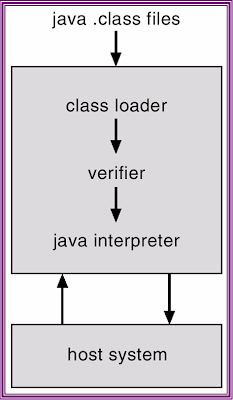
-Interpretation of Java bytecode results in slow execution of program.First version of Java Virtual Machine(JVM) implementation was relied on interpretation techniques. On the other hand performance can be improved by translating the Java bytecode into machine code by a Just-In-Time(JIT) compiler and this technique is being integrated into most JVM implementations. Java is an automatic garbage collected language, freeing the programmer from the explicit memory management. Garbage collection "pause" time can be reduced by using a generational garbage collection. This thesis describes an implementation of a JVM. The specific contributions made in this thesis include: development of a Just-In-Time(JIT) compiler using DAG construction technique, a bytecode interpreter, a generational garbage collector. Our implementation can execute Java bytecode either by an interpreter or the bytecode can be translated into machine code using the JIT compiler and the translated code is directly executed by the processor. We have implemented the Java Native Interface (JNI) to enable using C and assembly language programs with Java.
BENEFITS OF VIRTUAL MACHINE
-Virtual machines have been around for a long time but they really have not become common place in many development shops. It is unfortunate since virtual machines provide so many benefits to developers and testers alike. This article will discuss some of the benefits of virtual machines and review two of the most popular virtual machine software packages available for Windows.
EXAMPLE OF VIRTUAL MACHINE
-
• A virtual machine provides an interface identical to theunderlying bare hardware.
• The operating system creates the illusion of multipleprocesses, each executing on its own processor with its own(virtual) memory.
• The resources of the physical computer are shared to createthe virtual machines.
– CPU scheduling can create the appearance that usershave their own processor.
– Spooling and a file system can provide virtual card readeand virtual line printers.
– A normal user time-sharing terminal serves as the virtualmachine operator’s console.
IMPLEMENTATION OF VIRTUAL MACHINE
-Interpretation of Java bytecode results in slow execution of program.First version of Java Virtual Machine(JVM) implementation was relied on interpretation techniques. On the other hand performance can be improved by translating the Java bytecode into machine code by a Just-In-Time(JIT) compiler and this technique is being integrated into most JVM implementations. Java is an automatic garbage collected language, freeing the programmer from the explicit memory management. Garbage collection "pause" time can be reduced by using a generational garbage collection. This thesis describes an implementation of a JVM. The specific contributions made in this thesis include: development of a Just-In-Time(JIT) compiler using DAG construction technique, a bytecode interpreter, a generational garbage collector. Our implementation can execute Java bytecode either by an interpreter or the bytecode can be translated into machine code using the JIT compiler and the translated code is directly executed by the processor. We have implemented the Java Native Interface (JNI) to enable using C and assembly language programs with Java.
BENEFITS OF VIRTUAL MACHINE
-Virtual machines have been around for a long time but they really have not become common place in many development shops. It is unfortunate since virtual machines provide so many benefits to developers and testers alike. This article will discuss some of the benefits of virtual machines and review two of the most popular virtual machine software packages available for Windows.
EXAMPLE OF VIRTUAL MACHINE
-
SYSTEM GENARATION (SYSGEN)
> Operating systems are designed to run on any of a class of machines; the system must be configured for each specific computer siten SYSGEN program obtains information concerning the specific configuration of the hardware systemn Booting
– starting a computer by loading the kerneln Bootstrap program
– code stored in ROM that is able to locate the kernel, load it into memory, and start its execution
– starting a computer by loading the kerneln Bootstrap program
– code stored in ROM that is able to locate the kernel, load it into memory, and start its execution
Thursday, July 2, 2009
1.) SYSTEM COMPONENT
OPERATING SYSTEM PROCESS MANAGEMENT
-A process is a program in execution. A process needs certain resources: CPU time, memory (address space), files, and I/O devices, to accomplish its task.
The operating system is responsible for the following activities in connection with process management.
>Process creation and deletion.
>Process suspension and resumption.
>Provision of mechanisms for:
>Process synchronization
>Process communication
MAIN MEMORY MANAGEMENT
-Memory is a large array of words or bytes, each with its own address. It is a repository of instructions and data shared by the CPU and I/O devices. Main memory is a volatile storage device. It loses its contents in the case of system failure.
The operating system is responsible for the following activities in connections with memory management:
>Decide which processes to load when memory space becomes available.
>Allocate and deallocate memory space as needed. Keep track of which parts of memory are currently being used and by whom.
FILE MANAGEMENT
-A file is a collection of related information defined by its creator. Commonly, files represent programs (both source and object forms) and data.
The operating system is responsible for the following activities in connections with file management:
>File creation and deletion.
>Directory creation and deletion.
>Support of primitives for manipulating files and directories.
>Mapping files onto secondary storage.
>File backup on stable (nonvolatile) storage media.
>Files on floppy are inaccessible
>Ffiles on floppy are part of file hierarchy
I/O SYSTEM MANAGEMENT
-The I/O system consists of:
>A buffer-caching system
>A general device-driver interface
>Drivers for specific hardware devices
SECONDARY STORAGE MANAGEMENT
-Since main memory (primary storage) is volatile and too small to accommodate all data and programs permanently, the computer system must provide secondary storage to back up main memory.
Most modern computer systems use disks as the principle on-line storage medium, for both programs and data.
The operating system is responsible for the following activities in connection with disk management:
-->Free space management
-->Storage allocation
-->Disk scheduling
PROTETION SYSTEM
-Protection refers to a mechanism for controlling access by programs, processes, or users to both system and user resources.
The protection mechanism must:
>Distinguish between authorized and unauthorized usage.
>Specify the controls to be imposed.
>Provide a means of enforcement.
COMMAND-INTERPRETER
-Command-Interpreter reads commands from the user or from a file of commandsand executes them, usually by turning them into one or more systemcalls. It is usually not part of the kernel since the command interpreteris subject to changes.
The program that reads and interprets control statements is called variously:
>command-line interpreter
>shell (in UNIX)Its function is to get and execute the next command statement
-A process is a program in execution. A process needs certain resources: CPU time, memory (address space), files, and I/O devices, to accomplish its task.
The operating system is responsible for the following activities in connection with process management.
>Process creation and deletion.
>Process suspension and resumption.
>Provision of mechanisms for:
>Process synchronization
>Process communication
MAIN MEMORY MANAGEMENT
-Memory is a large array of words or bytes, each with its own address. It is a repository of instructions and data shared by the CPU and I/O devices. Main memory is a volatile storage device. It loses its contents in the case of system failure.
The operating system is responsible for the following activities in connections with memory management:
>Decide which processes to load when memory space becomes available.
>Allocate and deallocate memory space as needed. Keep track of which parts of memory are currently being used and by whom.
FILE MANAGEMENT
-A file is a collection of related information defined by its creator. Commonly, files represent programs (both source and object forms) and data.
The operating system is responsible for the following activities in connections with file management:
>File creation and deletion.
>Directory creation and deletion.
>Support of primitives for manipulating files and directories.
>Mapping files onto secondary storage.
>File backup on stable (nonvolatile) storage media.
>Files on floppy are inaccessible
>Ffiles on floppy are part of file hierarchy
I/O SYSTEM MANAGEMENT
-The I/O system consists of:
>A buffer-caching system
>A general device-driver interface
>Drivers for specific hardware devices
SECONDARY STORAGE MANAGEMENT
-Since main memory (primary storage) is volatile and too small to accommodate all data and programs permanently, the computer system must provide secondary storage to back up main memory.
Most modern computer systems use disks as the principle on-line storage medium, for both programs and data.
The operating system is responsible for the following activities in connection with disk management:
-->Free space management
-->Storage allocation
-->Disk scheduling
PROTETION SYSTEM
-Protection refers to a mechanism for controlling access by programs, processes, or users to both system and user resources.
The protection mechanism must:
>Distinguish between authorized and unauthorized usage.
>Specify the controls to be imposed.
>Provide a means of enforcement.
COMMAND-INTERPRETER
-Command-Interpreter reads commands from the user or from a file of commandsand executes them, usually by turning them into one or more systemcalls. It is usually not part of the kernel since the command interpreteris subject to changes.
The program that reads and interprets control statements is called variously:
>command-line interpreter
>shell (in UNIX)Its function is to get and execute the next command statement
3.) SYSTEM CALLS
- An operating system (O/S) is a program with two jobs: it manages the resources of the computer (peripherals, files, memory, etc.) and it manages all other programs running on the computer.
PROCESS CONTROL
-Process control is a statistics and engineering discipline that deals with architectures, mechanisms, and algorithms for controlling the output of a specific process. See also control theory.
For example, heating up the temperature in a room is a process that has the specific, desired outcome to reach and maintain a defined temperature (e.g. 20°C), kept constant over time. Here, the temperature is the controlled variable. At the same time, it is the input variable since it is measured by a thermometer and used to decide whether to heat or not to heat. The desired temperature (20°C) is the setpoint. The state of the heater (e.g. the setting of the valve allowing hot water to flow through it) is called the manipulated variable since it is subject to control actions.
A commonly used control device called a programmable logic controller, or a PLC, is used to read a set of digital and analog inputs, apply a set of logic statements, and generate a set of analog and digital outputs. Using the example in the previous paragraph, the room temperature would be an input to the PLC. The logical statements would compare the setpoint to the input temperature and determine whether more or less heating was necessary to keep the temperature constant. A PLC output would then either open or close the hot water valve, an incremental amount, depending on whether more or less hot water was needed. Larger more complex systems can be controlled by a Distributed Control System (DCS) or SCADA system.
FILE MANAGEMENT
-The term computer file management refers to the manipulation of [document]s and [data] in [Computer filefile]s on a [computer]].
Specifically, one may create a new file or edit an existing file and save it; open or load a pre-existing file into memory; or close a file without saving it. Additionally, one may group related files in directories. These tasks are accomplished in different ways in different operating systems and depend on the user interface design and, to some extent, the storage medium being used.
DEVICE MANAGEMENT
-Device Management is a set of technologies, protocols and standards used to allow the remote management of mobile devices, often involving updates of firmware over the air (FOTA). The network operator, handset OEM or in some cases even the end-user (usually via a web portal) can use Device Management, also known as Mobile Device Management, or MDM, to update the handset firmware/OS, install applications and fix bugs, all over the air. Thus, large numbers of devices can be managed with single commands and the end-user is freed from the requirement to take the phone to a shop or service center to refresh or update.
For companies, a Device Management system means better control and safety as well as increased efficiency, decreasing the possibility for device downtime. As the number of smart devices increases in many companies today, there is a demand for managing, controlling and updating these devices in an effective way. As mobile devices have become true computers over the years, they also force organizations to manage them properly. Without proper management and security policies, mobile devices pose threat to security: they contain lots of information, while they may easily get into wrong hands. Normally an employee would need to visit the IT / Telecom department in order to do an update on the device. With a Device Management system, that is no longer the issue. Updates can easily be done "over the air". The content on a lost or stolen device can also easily be removed by "wipe" operations. In that way sensitive documents on a lost or a stolen device do not arrive in the hands of others.
INFORMATION MAINTENANCE
-A one or two-year program open to juniors and seniors who want to work with the repair and maintenance of computers OR the networking of computers. Repair and maintenance: This class will prepare students with competencies essential for repairing and maintaining computer hardware and operating systems, as well as simple network concepts. Qualified students may enroll in coursework that may lead to certification as an A+ Computer Technician. Networking: Second year students may enroll in Cisco Academy or sample the high tech areas of computer usage that include internet concepts and applications and computer hardware and electronic interfacing projects. Qualified students may enroll in coursework that may lead to a Cisco Certified Network Associate (CCNA) or Network+ Certification.
PROCESS CONTROL
-Process control is a statistics and engineering discipline that deals with architectures, mechanisms, and algorithms for controlling the output of a specific process. See also control theory.
For example, heating up the temperature in a room is a process that has the specific, desired outcome to reach and maintain a defined temperature (e.g. 20°C), kept constant over time. Here, the temperature is the controlled variable. At the same time, it is the input variable since it is measured by a thermometer and used to decide whether to heat or not to heat. The desired temperature (20°C) is the setpoint. The state of the heater (e.g. the setting of the valve allowing hot water to flow through it) is called the manipulated variable since it is subject to control actions.
A commonly used control device called a programmable logic controller, or a PLC, is used to read a set of digital and analog inputs, apply a set of logic statements, and generate a set of analog and digital outputs. Using the example in the previous paragraph, the room temperature would be an input to the PLC. The logical statements would compare the setpoint to the input temperature and determine whether more or less heating was necessary to keep the temperature constant. A PLC output would then either open or close the hot water valve, an incremental amount, depending on whether more or less hot water was needed. Larger more complex systems can be controlled by a Distributed Control System (DCS) or SCADA system.
FILE MANAGEMENT
-The term computer file management refers to the manipulation of [document]s and [data] in [Computer filefile]s on a [computer]].
Specifically, one may create a new file or edit an existing file and save it; open or load a pre-existing file into memory; or close a file without saving it. Additionally, one may group related files in directories. These tasks are accomplished in different ways in different operating systems and depend on the user interface design and, to some extent, the storage medium being used.
DEVICE MANAGEMENT
-Device Management is a set of technologies, protocols and standards used to allow the remote management of mobile devices, often involving updates of firmware over the air (FOTA). The network operator, handset OEM or in some cases even the end-user (usually via a web portal) can use Device Management, also known as Mobile Device Management, or MDM, to update the handset firmware/OS, install applications and fix bugs, all over the air. Thus, large numbers of devices can be managed with single commands and the end-user is freed from the requirement to take the phone to a shop or service center to refresh or update.
For companies, a Device Management system means better control and safety as well as increased efficiency, decreasing the possibility for device downtime. As the number of smart devices increases in many companies today, there is a demand for managing, controlling and updating these devices in an effective way. As mobile devices have become true computers over the years, they also force organizations to manage them properly. Without proper management and security policies, mobile devices pose threat to security: they contain lots of information, while they may easily get into wrong hands. Normally an employee would need to visit the IT / Telecom department in order to do an update on the device. With a Device Management system, that is no longer the issue. Updates can easily be done "over the air". The content on a lost or stolen device can also easily be removed by "wipe" operations. In that way sensitive documents on a lost or a stolen device do not arrive in the hands of others.
INFORMATION MAINTENANCE
-A one or two-year program open to juniors and seniors who want to work with the repair and maintenance of computers OR the networking of computers. Repair and maintenance: This class will prepare students with competencies essential for repairing and maintaining computer hardware and operating systems, as well as simple network concepts. Qualified students may enroll in coursework that may lead to certification as an A+ Computer Technician. Networking: Second year students may enroll in Cisco Academy or sample the high tech areas of computer usage that include internet concepts and applications and computer hardware and electronic interfacing projects. Qualified students may enroll in coursework that may lead to a Cisco Certified Network Associate (CCNA) or Network+ Certification.
2.) OPERATING SYSTEM SERVICES
-An operating system (commonly abbreviated to either OS or O/S) is an interface between hardware and user; an OS is responsible for the management and coordination of activities and the sharing of the resources of the computer. The operating system acts as a host for computing applications that are run on the machine. As a host, one of the purposes of an operating system is to handle the details of the operation of the hardware. This relieves application programs from having to manage these details and makes it easier to write applications. Almost all computers (including handheld computers, desktop computers, supercomputers, video game consoles) as well as some robots, domestic appliances (dishwashers, washing machines), and portable media players use an operating system of some type. [1] Some of the oldest models may however use an embedded operating system, that may be contained on a compact disk or other data storage device.
Operating systems offer a number of services to application programs and users. Applications access these services through application programming interfaces (APIs) or system calls. By invoking these interfaces, the application can request a service from the operating system, pass parameters, and receive the results of the operation. Users may also interact with the operating system with some kind of software user interface (UI) like typing commands by using command line interface (CLI) or using a graphical user interface (GUI, commonly pronounced “gooey”). For hand-held and desktop computers, the user interface is generally considered part of the operating system. On large multi-user systems like Unix and Unix-like systems, the user interface is generally implemented as an application program that runs outside the operating system. (Whether the user interface should be included as part of the operating system is a point of contention.)
Operating systems offer a number of services to application programs and users. Applications access these services through application programming interfaces (APIs) or system calls. By invoking these interfaces, the application can request a service from the operating system, pass parameters, and receive the results of the operation. Users may also interact with the operating system with some kind of software user interface (UI) like typing commands by using command line interface (CLI) or using a graphical user interface (GUI, commonly pronounced “gooey”). For hand-held and desktop computers, the user interface is generally considered part of the operating system. On large multi-user systems like Unix and Unix-like systems, the user interface is generally implemented as an application program that runs outside the operating system. (Whether the user interface should be included as part of the operating system is a point of contention.)
Subscribe to:
Posts (Atom)